
Running an online conference involves much more than opening a video call.
Once your event includes multiple speakers, several sessions, an agenda, registrations, tickets, networking, sponsors, or replay content, the platform becomes part of the attendee experience.
The challenge is that online conference platforms are built for very different kinds of events.
A creator running a six-speaker virtual summit does not need the same infrastructure as an international trade show with thousands of attendees and hundreds of exhibitors. A professional association may care deeply about networking, while a marketing team may care more about lead data and integrations.
Best Online Conference Platforms at a Glance
| Platform | Best for | Multi-session | Live video approach | Ticketing |
|---|---|---|---|---|
| Gala Rise | Creator and community conferences | Yes | GoBrunch integration | Yes |
| Zoom Events | Professional multi-session conferences | Yes | Zoom ecosystem | Yes |
| Airmeet | Networking-focused conferences | Yes | Built into platform | Yes |
| Whova | Associations and hybrid conferences | Yes | Streaming and integrations | Yes |
| vFairs | Expos and trade shows | Yes | Webinar and streaming tools | Yes |
| Webex Events | Enterprise event programs | Yes | Webex ecosystem | Yes |
| HeySummit | Speaker-led online summits | Yes | External video provider | Yes |
| Livestorm | Marketing-led conferences | Yes | Browser-based live video | Registration focused |
| Eventzilla | Practical conference management | Yes | Event and integration focused | Yes |
| Bizzabo | Enterprise event portfolios | Yes | Virtual production tools | Yes |
The best online conference platform is not the one with the most features. It is the one that matches the structure of your conference.
What Is an Online Conference Platform?
An online conference platform is software used to organize and deliver structured conferences over the internet.
The important word is structured.
A video meeting might have one room, one host, and one conversation. An online conference may have an opening keynote, an industry panel, two workshops happening at the same time, networking, a guest speaker, and a closing session.
Once that happens, sending everyone a single video link is no longer enough.
Attendees need to know which sessions exist, when they happen, who is speaking, which sessions overlap, and how they join.
Organizers may also need an event website, registration, paid tickets, speaker profiles, parallel tracks, live rooms, networking, sponsor areas, attendee communication, replay content, and analytics.
That is where dedicated conference software becomes useful.
Online Conference Platform vs. Webinar Platform
Online conferences and webinars can both happen over video, but the event structure is usually different.
| Webinar | Online conference |
|---|---|
| Usually one main presentation | Multiple sessions |
| One or a few presenters | Many speakers |
| Mostly linear schedule | Full agenda, sometimes with parallel tracks |
| Often marketing or education focused | Broader event program |
| Single webinar registration | Conference-wide registration or tickets |
| One primary live room | Multiple sessions or rooms |
| One replay | Library of session recordings |
| Limited attendee navigation | Attendees move through an agenda |
A webinar platform can still be perfect when your event consists of one main session. Platforms such as Demio and WebinarJam specialize in webinar workflows.
What to Look for in an Online Conference Platform
Do not begin by comparing hundreds of features. Start with the structure of your event.
Multi-Session Agendas
This is one of the clearest differences between basic webinar software and conference software. Attendees should understand what is happening, when it is happening, who is speaking, which sessions overlap, and how they access each session.
Registration
A conference might need different attendee categories, custom questions, session access, approval workflows, invitations, waitlists, or group registrations. Think about the information you need before choosing a platform.
Ticketing
If the conference is paid, registration and access should work together. You may need free and paid tickets, multiple ticket levels, VIP access, early-bird pricing, discount codes, or session restrictions.
Speakers
A conference often has far more speakers than a webinar. Look for a clean way to connect speaker profiles, biographies, organizations, and sessions.
Live Rooms
Some platforms provide the live environment directly. Others manage the conference around another video or webinar provider. Neither model is automatically better.
Networking
Networking matters much more at a conference than it usually does during a webinar. Depending on the event, attendees may expect direct messages, meetings, matchmaking, networking tables, topic rooms, or attendee profiles.
Multiple Tracks
Larger conferences often run sessions simultaneously. The platform should make those choices understandable instead of forcing attendees to search through disconnected links.
Replay and On-Demand Content
Recordings become especially useful when sessions happen at the same time. An attendee may watch one live session and return for another later.
Branding
Your event page, registration experience, emails, attendee area, and session access should feel connected to the same conference.
Analytics and Integrations
Marketing and enterprise teams may need session attendance, ticket revenue, sponsor activity, networking data, CRM integrations, email automation, and other event data. A smaller community conference may need much less.
The 10 Best Online Conference Platforms
These platforms are not ranked as if every event has the same needs. Each one is included for the conference use case where it makes the most sense.
Gala Rise
Gala Rise is designed around the event experience rather than only the live video room.
Organizers can create a professional event page and connect registration, paid tickets, agendas, speakers, live access, and replay around the same event.
Imagine a creator organizing an online conference with eight speakers, a full-day agenda, three workshops, paid registration, live sessions, and recordings afterward. Gala Rise lets those parts live around one recognizable event instead of treating the landing page, ticket checkout, schedule, live access, and replay as unrelated systems.
How live sessions work in Gala Rise
Gala Rise does not provide its own native videoconferencing engine. For the live experience, it integrates with GoBrunch. A GoBrunch room can be created and linked to the Gala Rise event so registered participants can access the live experience when it becomes available.
Gala Rise handles the conference experience. GoBrunch handles the live room.
Gala Rise fits a focused creator, education, community, or smaller professional conference better than a massive enterprise expo with hundreds of sponsors.
Best reason to choose Gala Rise: You want the conference page, registration or tickets, speakers, agenda, live access, and replay to feel like one connected event.
Zoom Events
Most people already understand how to join a Zoom meeting. Zoom Events expands that familiar ecosystem into structured event experiences.
It is designed for multi-session and multi-day events, concurrent sessions, event lobbies, exhibitor experiences, networking, and paid or free access.
The strongest advantage is familiarity. Attendees and presenters may already know the video environment, reducing one source of friction.
For a small six-session creator summit, however, the broader ecosystem may be more than the organizer needs.
Best reason to choose Zoom Events: Your conference needs serious multi-session functionality while keeping the familiar Zoom live experience.
Airmeet
A conference is not always about watching speakers. Sometimes the main value comes from who else is attending.
Airmeet puts significant emphasis on networking through lounges, matchmaking, attendee profiles, discussion tables, meetings, and social interaction around the event.
That makes it particularly relevant when the event promise includes meeting people in the industry, creating professional connections, or building community.
Best reason to choose Airmeet: Networking is a central product of the conference, not simply an optional chat window.
Whova
Whova combines conference sessions with a strong attendee-community layer.
It is particularly interesting for organizations where conference relationships continue beyond individual sessions, such as professional associations, member organizations, academic conferences, and hybrid events.
Community discussions, profiles, meetups, networking features, session engagement, and exhibitor experiences can all be valuable in these settings.
Best reason to choose Whova: You need structured conference management combined with strong attendee engagement and community features.
vFairs
vFairs is much closer to a digital venue than a simple webinar tool.
It can support virtual lobbies, exhibition halls, auditoriums, sponsor areas, booths, multiple tracks, webinars, networking, and large event programs.
Imagine an online trade show with 50 exhibitors, several stages, product demonstrations, networking, and thousands of visitors. That is a very different requirement from an eight-speaker creator conference.
If your event does not have sponsors, exhibitors, or an expo component, much of this strength may be unnecessary.
Best reason to choose vFairs: Your online conference needs to behave like an expo or trade show rather than simply a collection of video sessions.
Webex Events
Webex Events is designed for broader event programs that can include virtual, in-person, and hybrid formats.
Large organizations often care about more than whether attendees can watch a livestream. Governance, corporate integrations, analytics, support, sponsor management, hybrid functionality, and event scale may all matter.
This makes Webex Events much more relevant to enterprise organizations than to a small independent organizer.
Best reason to choose Webex Events: Your organization needs an enterprise event platform that fits into a broader Webex environment.
HeySummit
HeySummit takes an event-layer approach. It manages the summit experience around sessions rather than depending on being the video provider itself.
This is useful for speaker-heavy events with ticket tiers, session schedules, speaker pages, replay access, sponsors, and promotional workflows.
HeySummit and Gala Rise share an interesting architectural idea: the platform organizing the event does not have to be the same system delivering the video.
HeySummit is particularly focused on summits, talks, speaker management, sponsors, affiliates, and event marketing.
Best reason to choose HeySummit: You are organizing a speaker-heavy online summit and want specialized tools around talks and presenters.
Livestorm
Livestorm sits between webinar software and conference software.
Its browser-based live experience, registration, branding, email communication, contact data, and multi-session workflows make it particularly useful when a conference is closely connected to a marketing funnel.
A marketing conference may want to know who registered, who attended, what questions were asked, which sessions people joined, and what happens in the CRM afterward.
Best reason to choose Livestorm: Your event needs conference structure but remains closely connected to webinar and marketing workflows.
Eventzilla
Eventzilla focuses strongly on the operational side of events, including event websites, registration, ticketing, agendas, speakers, event hubs, engagement, integrations, and reporting.
Not every organizer needs a three-dimensional virtual venue. Often the real questions are simpler: Can people register? Can we sell tickets? Can we publish the agenda? Can attendees find what they need?
Best reason to choose Eventzilla: You want practical conference management tools without making the virtual environment itself the main attraction.
Bizzabo
Bizzabo is built for organizations operating events as an ongoing program rather than buying software for one conference.
An enterprise may run monthly webinars, customer conferences, regional events, product launches, internal programs, and an annual flagship event. At that point, event data and production become an organizational capability.
For a small conference, this may be far more infrastructure than necessary.
Best reason to choose Bizzabo: You operate a sophisticated enterprise event program rather than one standalone online conference.
Best Online Conference Platform by Use Case
There is no meaningful universal winner. A more useful question is: what kind of conference are you organizing?
| Your event | Platforms to consider |
|---|---|
| Creator conference | Gala Rise, HeySummit |
| Community conference | Gala Rise, Airmeet |
| Professional multi-session conference | Zoom Events |
| Networking conference | Airmeet |
| Association conference | Whova |
| Academic conference | Whova |
| Trade show or expo | vFairs |
| Enterprise conference | Webex Events, Bizzabo |
| Speaker-led summit | HeySummit |
| Marketing conference | Livestorm |
| Practical conference management | Eventzilla |
| Hybrid conference | Whova, Zoom Events, Webex Events |
Do You Need Native Video Conferencing?
One of the most important architectural differences between online conference platforms is how they handle video.
When Native Video Makes Sense
Native video can simplify session management, analytics, support, attendee access, and presenter workflows. It can also be attractive when your organization already uses that provider.
When an Event Layer Makes Sense
A modular setup can work well when conference organization matters more than advanced broadcasting, when you already like your live platform, or when you want flexibility between the event layer and the virtual room.
Gala Rise follows this model through its GoBrunch integration. The page, registration, tickets, agenda, speakers, and replay are organized around the Gala Rise event, while GoBrunch provides the live room.
Neither architecture is automatically better. The important thing is understanding which model you are buying.
How Much Should an Online Conference Platform Cost?
There is no useful single average because conference software uses several pricing models.
Monthly Subscription
Common among platforms serving creators, smaller businesses, and recurring event organizers.
Annual Subscription
Enterprise and professional platforms frequently work through annual contracts, with pricing based on event volume, attendees, products, or organizational requirements.
Pay Per Attendee
This can be attractive for occasional conferences but should be modeled carefully for larger events.
Per Event
Some organizers pay separately for an individual conference or event package, which can make sense for infrequent events.
Transaction Fees
Ticketing platforms may charge a percentage or flat fee when you sell paid tickets. Calculate the cost at your expected ticket revenue rather than looking only at the advertised subscription price.
Enterprise Quote
Large platforms frequently require contacting sales when pricing depends on attendee volume, support, integrations, branding, production, sponsors, and hybrid requirements.
Do not ask only which platform is cheapest. Ask what it costs at the scale and complexity of your actual event.
How to Choose an Online Conference Platform
Before creating trials on ten different products, answer these questions.
1. How Many Sessions Do You Have?
One session may only require webinar software. Thirty sessions need a proper agenda.
2. How Many Attendees Do You Expect?
A conference for 80 people and one for 8,000 people have very different requirements. Large events put more pressure on video infrastructure, support, moderation, navigation, networking, and analytics.
3. Will Sessions Happen at the Same Time?
Parallel tracks immediately increase complexity. Attendees need to understand their choices and move between sessions easily.
4. Are You Selling Tickets?
Check payment providers, transaction fees, ticket tiers, refunds, currencies, and access control.
5. How Important Is Networking?
If meeting other attendees is one of the reasons people buy tickets, evaluate networking carefully. This is where platforms such as Airmeet and Whova become more interesting.
6. Do You Have Sponsors or Exhibitors?
Decide whether sponsors need simple visibility, dedicated pages, lead capture, meetings, booths, or a full expo hall.
7. Do You Need Native Live Video?
Decide whether using an integrated external live room is acceptable or whether the platform itself must handle video.
8. Do You Need Replay?
For conferences with concurrent sessions, replay can dramatically increase the value of the ticket because attendees cannot watch two live sessions at once.
9. What Happens After the Conference?
Your post-event workflow may include replay, materials, community access, the next event, analytics, or sales follow-up.
10. What Can Your Team Actually Operate?
Software can look impressive in a demo and still create unnecessary work. Choose a platform your organizers, speakers, and attendees can realistically use.
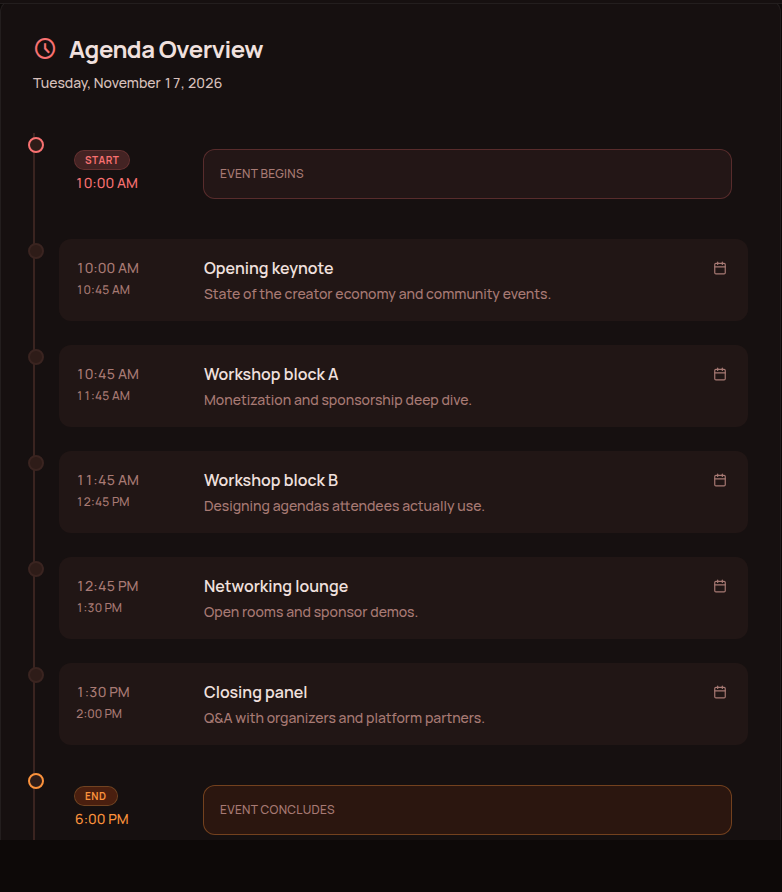
Example: What a Multi-Session Online Conference Needs
Imagine you are organizing an online conference for 400 attendees with 12 speakers and paid tickets.
- Opening keynote
- Industry panel
- Track A: Marketing workshop
- Track B: Product demonstration
- Networking
- Guest speaker
- Track A: Community workshop
- Track B: Technical session
- Closing session
At this point, the software needs to manage much more than video.
You need a conference page, registration and ticketing, speaker profiles, a multi-session agenda, live destinations, attendee navigation, and replay.
This is why conference software exists. The live video is only one layer.
How Gala Rise Handles an Online Conference
Before the Conference
The organizer can create the event page, publish speakers and the agenda, collect registrations, and sell tickets. Instead of sending potential attendees between an event website, payment link, form, and separate schedule, the information can live around the same event experience.
During the Conference
The agenda helps participants understand what is happening. For the live component, the event connects to GoBrunch so registered participants can access the live room when it becomes available.
After the Conference
The event can continue to provide replay content and materials after the live session ends.
This makes Gala Rise particularly relevant when you want the conference to have one recognizable home before, during, and after the event.
It is not designed to replace enterprise expo software. A conference with hundreds of exhibitors, advanced matchmaking, complex sponsor programs, and large production requirements belongs to a different category.
Online Conference vs. Virtual Event vs. Hybrid Event
Online Conference
A structured conference delivered entirely over the internet. It usually involves several speakers or sessions and may contain multiple tracks.
Virtual Event
Virtual event is the broader category. A virtual event might be a conference, webinar, workshop, networking event, class, community meetup, or livestream.
If you are still comparing broader formats, see our guide to virtual event platforms.
Hybrid Conference
A hybrid conference has both in-person and remote participation. This creates another layer of complexity because organizers need to design an experience that works for both audiences.
Our hybrid events guide covers that format in more detail.
Frequently Asked Questions
What is an online conference platform?
An online conference platform is software used to organize and deliver structured conferences over the internet. It may include event pages, registration, ticketing, agendas, speakers, multiple sessions, live rooms, attendee networking, sponsor features, replay, and analytics.
What is the best online conference platform?
There is no universal best platform. Gala Rise can fit creator and community conferences, Zoom Events works well for professional multi-session events, Airmeet specializes in networking, Whova is strong for associations, vFairs suits expos, and enterprise organizers may consider products such as Webex Events or Bizzabo.
What features should an online conference platform have?
Important features can include registration, ticketing, speaker profiles, a multi-session agenda, live session access, attendee networking, multiple tracks, replay, branding, analytics, and integrations. Not every conference needs all of them.
What is the difference between a webinar and an online conference?
A webinar usually consists of one main presentation or a small number of related sessions. An online conference generally includes a broader program with multiple speakers, sessions, an agenda, and potentially parallel tracks, networking, sponsors, or exhibitors.
Can I host an online conference for free?
It is possible to run a small conference using free tools, but the workflow may require several separate systems for registration, scheduling, video, and content. As conference complexity increases, dedicated event software usually becomes more useful.
How much does an online conference platform cost?
Pricing varies significantly. Platforms may charge monthly, annually, per attendee, per event, through ticketing fees, or through custom enterprise contracts. Compare prices using your expected attendee count and actual event requirements.
What platform should I use for a virtual conference?
For a creator or community conference, consider an event-focused platform such as Gala Rise or a summit platform such as HeySummit. For professional multi-session events, Zoom Events may fit. For networking, consider Airmeet. For expos and trade shows, vFairs may be more appropriate. For enterprise event programs, platforms such as Webex Events or Bizzabo can make more sense.
Do online conference platforms support multiple speakers?
Yes. Conference software is generally designed to manage several speakers and sessions. More advanced platforms may also support speaker portals, abstract submissions, bios, session assignments, and presenter communications.
Can online conference platforms sell tickets?
Many can. Gala Rise, Zoom Events, Eventzilla, HeySummit, and several other event platforms support paid event access or ticketing workflows. Always verify payment providers, currencies, transaction fees, and ticket limitations before choosing a platform.
Do I need native video conferencing?
Not necessarily. Some online conference platforms include native video. Others manage the event experience while connecting to another webinar, streaming, or videoconferencing provider. The right architecture depends on your workflow.
How do you run a multi-session online conference?
Start by defining the conference agenda, sessions, tracks, and speakers. Then create the event page, open registration or ticket sales, configure session access, prepare live rooms, test the attendee journey, and make it easy for participants to move between the agenda and each session. If sessions overlap, consider making recordings available afterward.
Can Gala Rise host an online conference?
Gala Rise can organize an online conference around event pages, registration, paid tickets, agendas, speakers, live access, and replay. The videoconference itself is provided through the GoBrunch integration rather than a native Gala Rise video system.
Final Thoughts
There is no single online conference platform that makes sense for every event.
A creator summit does not need to be managed like an enterprise trade show. A trade show should not be forced into software designed for a 100-person workshop. A networking conference needs different tools from a marketing webinar.
Start with the event structure.
How many people are coming? How many sessions will happen? Will sessions overlap? Are tickets paid? Do people need to network? Are there sponsors? Do you need booths? Will attendees watch recordings afterward? Do you need native video?
Once those questions are clear, choosing the platform becomes much easier.
The best online conference platform is not the one with the most features. It is the one that fits the conference you are actually trying to run.
Planning an online conference?
Create the conference page, manage registrations and tickets, publish your agenda and speakers, connect a GoBrunch live room, and keep replay content around the same event experience.
Start with Gala Rise