
Hybrid events combine an in-person experience with an online experience, giving people more than one way to attend the same event.
You can have 30 people gathered in a studio, classroom, conference room, or community space while another 100 join from their homes, offices, or other countries. Everyone is attending the same event, just in different ways.
But a successful hybrid event is more than an in-person event with a camera pointed at the stage. You are designing an experience for two audiences: the people in the room and the people joining online.
In this guide, we cover what hybrid events are, how they work, the technology you need, the challenges to expect, and how to plan an experience that works for both in-person and online attendees.
What Is a Hybrid Event?
A hybrid event is an event that combines an in-person experience with an online experience, allowing people to participate either physically or remotely.
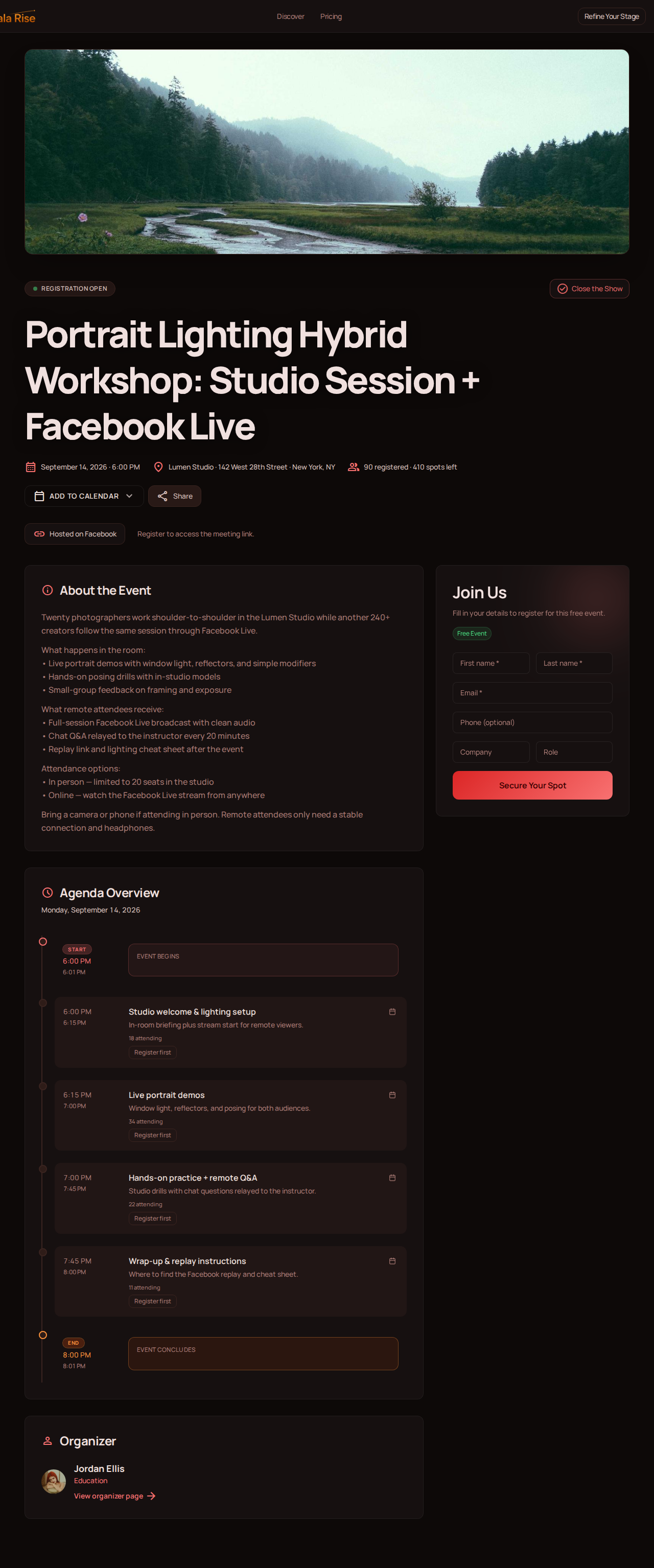
Imagine a photography teacher running a live workshop.
Twenty students are sitting inside the studio with the instructor. Another 80 students are watching online, asking questions, following the exercises, and interacting with the session from different cities.
There is one event, but there are two ways to attend it.
Hybrid events can work for almost any experience that benefits from bringing people together, including conferences, workshops, classes, meetups, community events, product launches, talks, training sessions, and creator-led experiences.
The important distinction is that the online audience should not be treated as an afterthought.
A better hybrid event is intentionally designed around both audiences.
Simply livestreaming what happens in a physical room gives remote people access to the content, but it does not necessarily give them a good event experience.
How Do Hybrid Events Work?
Most hybrid events have three main parts: a physical experience, a digital experience, and a connection between the two.
The physical side is what you would expect from a traditional event. There may be a venue, speakers, chairs, workshops, networking, food, printed materials, or anything else that makes sense for the experience.
The digital side gives remote attendees a place to participate. They need to know where to register, what is happening, when sessions begin, how to join, and where they can find recordings or resources afterward.
Then there is the connection between both sides.
A speaker presenting in the physical venue may also be speaking to hundreds of people online. A question submitted by a remote attendee may be answered by the speaker. A poll might include participants from both audiences. A session could even feature a speaker joining remotely while the audience watches from both the venue and online.
This is what makes hybrid events interesting: the physical and online experiences do not have to be separate events.
They can be two ways to participate in the same experience.
Physical venue
Speakers, seating, workshops, networking, printed materials, and the energy of people in the same room.
Digital experience
Registration, agenda, live stream or virtual room, chat, Q&A, replay, and resources after the event.
Hybrid Events vs. Virtual Events vs. In-Person Events
The difference between these formats is primarily about where attendees participate.
| Experience | In-person event | Virtual event | Hybrid event |
|---|---|---|---|
| Physical venue | Yes | No | Yes |
| Online attendance | Usually no | Yes | Yes |
| Face-to-face interaction | Yes | No | Yes, for on-site attendees |
| Geographic reach | Limited by location | Broad | Broad |
| Live online experience | Optional | Core experience | Part of the experience |
| Replay or on-demand content | Optional | Common | Common |
An in-person event requires attendees to be physically present. A virtual event happens entirely online. A hybrid event gives people the choice of participating in person or remotely.
Someone who lives nearby might prefer the energy of being in the room. Someone who lives thousands of kilometers away can still participate without booking a flight or hotel.
Neither experience has to replace the other.
What Types of Events Can Be Hybrid?
Hybrid events are often associated with large corporate conferences, but the format can work just as well, and sometimes better, for smaller events.
Workshops and classes
A watercolor teacher can host students in a local studio while members of an online audience follow along from home.
Community events and meetups
A professional community can organize its annual meetup in one city while inviting members around the world to participate remotely.
Creator events and interviews
A creator can host a live interview in front of a small audience and let hundreds of followers join the conversation online.
Guest lectures and training
A school can run a guest lecture on campus while giving remote students access to the same session.
Product demonstrations
A company can organize a product demonstration at its headquarters while partners and prospects join remotely.
Hybrid is not really a category of event. It is a way of delivering an event.
If an experience can be shared with people who are not physically in the room, there is probably a hybrid version of it.
Why Host Hybrid Events?
The most obvious advantage of hybrid events is reach.
A physical venue always creates a geographic limit. Even when someone wants to attend, travel costs, distance, scheduling conflicts, accessibility needs, or venue capacity can get in the way.
Adding an online experience removes many of those barriers.
Give attendees more flexibility
Not everyone wants or is able to attend an event the same way. Some people value face-to-face interaction and are willing to travel for it. Others would rather participate online.
A hybrid format gives attendees more control over how they experience your event.
Expand beyond the capacity of your venue
A venue might have space for 50 people, but your audience does not necessarily have to stop at 50.
The online side of a hybrid event lets you extend the experience beyond the physical limits of the room. For creators, communities, and schools, this can be especially useful. You can keep the physical event intimate while opening the digital experience to a much larger audience.
Reach people in different locations
A local event can become international without moving anywhere.
If your community is spread across different cities or countries, a hybrid format allows the physical event to remain rooted in one place while the online experience travels much further.
Create content that lasts beyond the event
A physical event is temporary. The room fills up, the presentation happens, people leave, and the live moment is over.
But the digital side can continue. Recordings, presentation materials, resources, and future event dates can give the experience a much longer life.
The Biggest Challenge of Hybrid Events: You Have Two Audiences
Hybrid events offer more flexibility, but they also introduce an important challenge.
You are no longer designing for one audience. You are designing for two.
The people sitting in the venue can see what is happening around them. They can talk to the person next to them, read the speaker's body language, hear the room react, and participate naturally.
Online attendees experience the event through a screen.
If nobody thinks about their experience, they can quickly feel like spectators watching something that was designed for everyone except them.
Your online audience should not be an afterthought.
Imagine a speaker asks, "Does anyone have a question?" Five hands go up in the physical room. Meanwhile, ten people have posted questions online, but nobody is watching the chat.
Technically, those ten people attended the event. Experientially, they were left out of the conversation.
A small change can completely alter that dynamic. A moderator can monitor online questions, share them with the speaker, welcome remote attendees by name, and make sure interaction flows between both audiences.
The goal does not have to be making the two experiences identical. It is making both experiences feel intentional.
- Sees body language, room energy, and side conversations
- Raises a hand and speaks naturally
- Uses printed materials and venue amenities
- Needs clear audio, visible slides, and a named moderator
- Submits questions through chat or a virtual room
- Expects joining instructions before the event starts
What Technology Do You Need for a Hybrid Event?
Hybrid event technology becomes easier to understand when you separate it into four layers.
1. Your event home
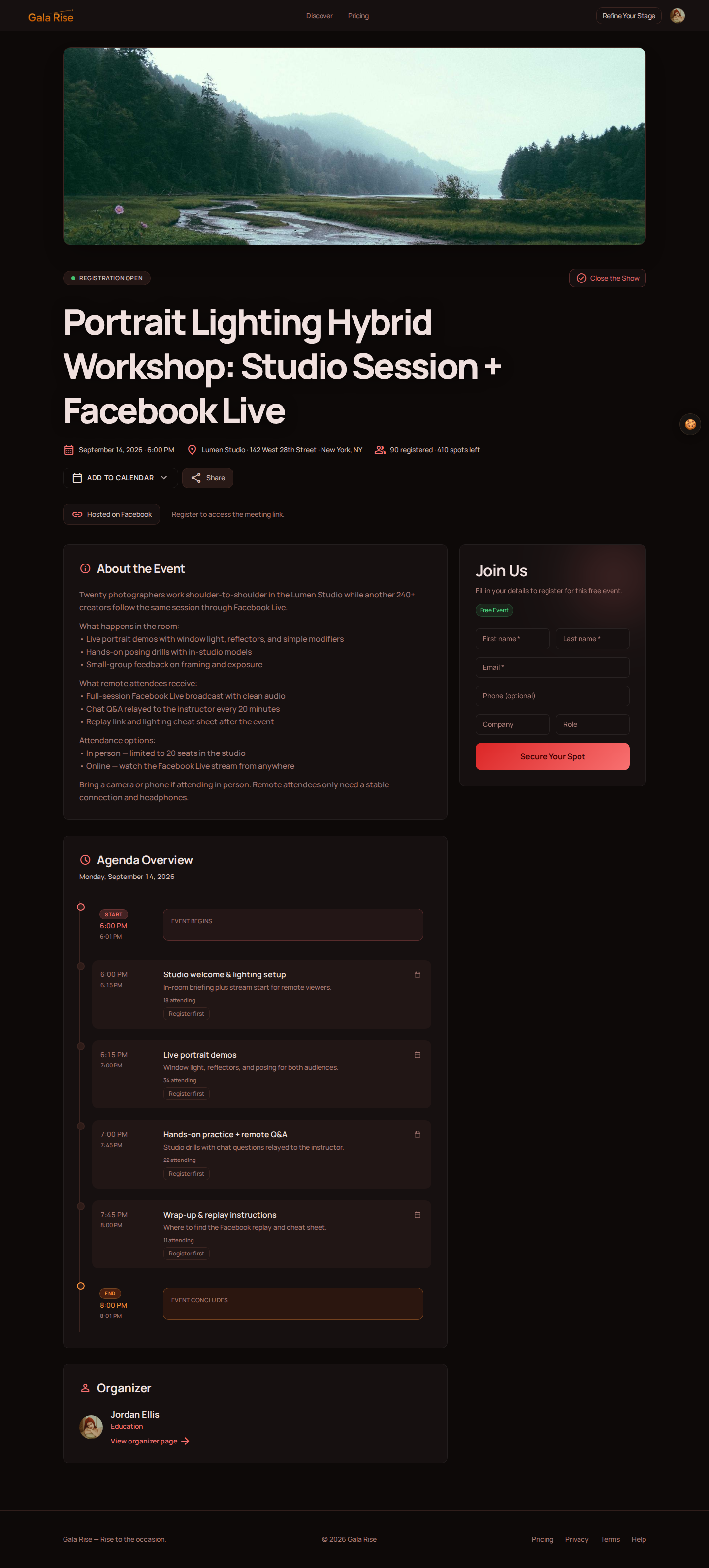
Before someone attends your event, they need somewhere to understand it.
This is your digital home base.
It should answer the questions attendees naturally have: What is this event? Who is it for? When does it happen? What is the agenda? Who is speaking? How do I register? How do I participate?
This page becomes the reference point you can share in an email, social post, community message, or invitation.
For a hybrid event, it should also make the attendance options clear. If part of the experience happens in person, explain the location and instructions for physical attendees. If another part happens online, explain how registered guests will access it.
2. Your physical venue
The physical side requires the infrastructure of an in-person event.
That may include microphones, speakers, cameras, lighting, screens, seating, power, and, especially important for a hybrid event, a reliable internet connection.
A six-person workshop in an art studio needs a very different production setup from a 500-person conference. You do not necessarily need a television-studio production. You need enough technology for remote participants to clearly see, hear, and understand what is happening.
Audio deserves particular attention. People will tolerate an imperfect camera much longer than they will tolerate audio they cannot understand.
3. Your online venue
Your remote attendees also need somewhere to experience the event.
The right option depends on the type of participation you want to create.
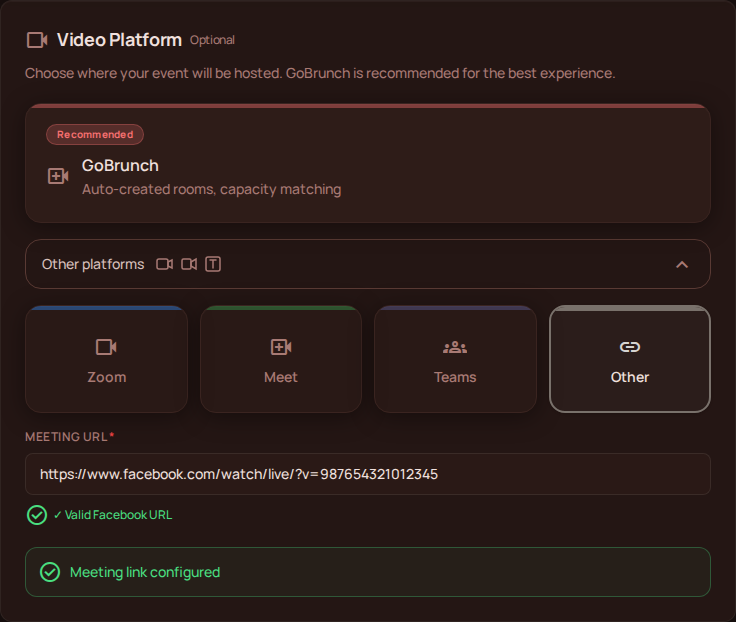
If you want an interactive experience where remote attendees can use microphones and cameras, chat, ask questions, and interact with other participants, you might use a virtual event platform such as GoBrunch.
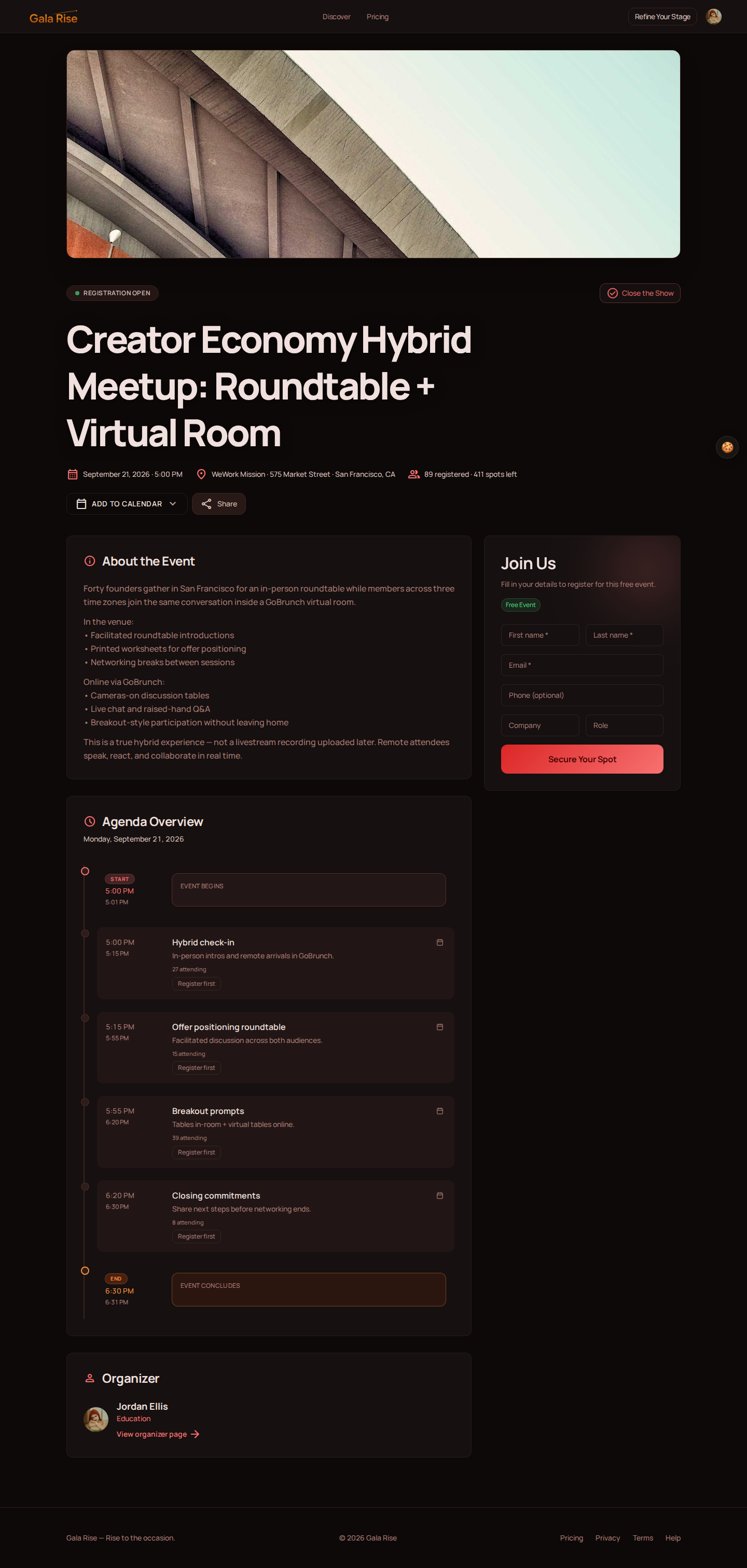
If the online side is primarily about broadcasting what is happening at the physical venue to a larger audience, you might choose a streaming platform such as YouTube Live, Facebook Live, or another livestreaming service.
The important question is not simply which platform you use. Ask what remote attendees should be able to do.
- Should they only watch?
- Should they ask questions?
- Should they talk to the host?
- Should they interact with each other?
- Should they join activities?
Your answers will help determine the right tool.
4. Your post-event experience
What happens when the live event ends?
For many hybrid events, the answer should not be "the page disappears."
You may have a recording, slides, documents, links, exercises, or other resources that attendees will want to revisit.
Keeping these materials connected to the event makes it easier for guests to find them and gives your event value beyond its live runtime.
How to Plan a Hybrid Event in 12 Steps
A hybrid event has more moving parts than a purely online or purely physical experience, so planning both sides together is important.
1. Define the goal of your event
Start with the outcome, not the technology. Are you teaching something? Building a community? Launching a product? Creating networking opportunities? Generating revenue? Your goal should influence every decision that follows.
2. Decide what the in-person experience should feel like
Think about the venue, capacity, speakers, activities, networking, seating, and anything attendees need physically.
3. Design the online experience separately
Ask what someone joining from home will see, hear, and do throughout the event. Do not assume that pointing a camera at the physical experience will automatically translate well online.
4. Choose how the two audiences will interact
Decide whether online attendees can submit questions, join discussions, participate in polls, speak during the event, or interact with in-person attendees.
5. Create a digital home for the event
Give attendees one place where they can understand the event, see the agenda, learn about speakers, register, and find the information they need.
6. Make attendance options clear
Explain what someone receives when attending in person versus online. If the experiences or ticket prices are different, communicate that before registration.
7. Prepare your physical production
Test microphones, cameras, lighting, screens, internet connectivity, power, and any equipment required to bring the physical experience online.
8. Prepare your online experience
Configure your virtual room or streaming setup, decide who will monitor remote participants, and make sure joining instructions are simple.
9. Brief your speakers
Anyone presenting should understand that there are two audiences. They should know where the cameras are, how remote questions will reach them, and how they should address online attendees.
10. Test the complete journey
Do not test only the livestream. Register as if you were an attendee, open the confirmation, find the event, access the online experience, watch from another device, test the audio, submit a question if the format supports it, and verify the entire flow.
11. Run the event with both audiences in mind
A dedicated person monitoring the online experience can make a significant difference, even for relatively small events.
12. Continue the experience afterward
Publish the replay if available, share resources, follow up with attendees, collect feedback, and give people an obvious way to discover what comes next.
How to Keep Online Attendees Engaged During a Hybrid Event
One of the easiest mistakes to make is assuming that remote attendees will pay attention simply because the content is good.
People sitting in a venue are surrounded by the event. Someone watching from a laptop is surrounded by everything else.
Email, messages, browser tabs, household distractions, and work are all competing for attention.
That makes interaction especially important.
A good host acknowledges online attendees instead of speaking only to the room. A moderator can share questions from remote participants with the speaker. Speakers can periodically address the camera rather than treating it as invisible.
The event can also include moments designed specifically for remote participation.
For example, instead of asking only the room to raise their hands, the host could ask everyone to answer a question online and then discuss the results with both audiences.
The goal is not to force every physical interaction into a digital format. The goal is to continually remind remote participants that they are attending the event, not merely watching it happen to somebody else.
Should In-Person and Online Tickets Cost the Same?
There is no universal rule.
The right ticket structure depends on what each attendee receives.
If in-person guests receive food, printed materials, hands-on activities, private networking sessions, or other experiences that remote attendees do not receive, different prices can make sense.
On the other hand, the online ticket should not automatically be treated as a lower-value version of the event.
A thoughtfully designed virtual experience can offer its own advantages, including convenience, access from anywhere, digital resources, recordings, and forms of interaction that may not exist physically.
Think about the value of each experience rather than simply the cost of delivering it. The important thing is to communicate the difference clearly.
How to Create the Digital Side of a Hybrid Event With Gala Rise
A hybrid event needs physical infrastructure, and Gala Rise is not designed to manage your physical venue or on-site production.
Instead, Gala Rise can serve as the online home for your hybrid event, giving attendees a central place to understand the experience before, during, and after it.
One event. Two audiences. One home online.
You can start by creating your event page with a title, description, speakers, and the information guests need to understand what you are organizing.
If part of the event happens in person, use the event description to explain the venue, address, arrival instructions, and any information physical attendees should know.
Guests can register for the event, paid events can sell tickets, and your agenda can show what is happening and when.
For remote attendees, you can choose the format that makes the most sense for your event.
If you want a more interactive virtual experience, Gala Rise integrates with GoBrunch, giving registered attendees access to a virtual room where participants can interact using features such as cameras, microphones, and chat.
If your goal is primarily to broadcast the physical event to remote viewers, you may prefer to use a streaming service such as YouTube Live, Facebook Live, or another platform and provide attendees with clear instructions for accessing the stream.
This distinction matters because not every hybrid event needs the same kind of online experience. A workshop may benefit from a virtual room where attendees can participate directly. A keynote or live performance might make more sense as a broadcast watched by a larger audience.
After the event, you can add a replay and materials to the event page so attendees know where to find them.
The physical venue might be a studio, classroom, theater, conference center, or coworking space.
The online home can stay the same.
Before the event, it tells people what is happening. During the event, it tells people where they need to go. After the event, it becomes the place where the experience continues.
Hybrid Event Best Practices
The best hybrid events are not necessarily the ones with the most expensive production.
They are the ones where the experience makes sense from both sides of the screen.
- Reduce friction. Attendees should not need to search through five tools, three emails, and an old calendar invitation to figure out how to participate.
- Keep event information centralized. Make the agenda, speakers, registration, access instructions, and post-event resources easy to find.
- Prioritize audio. Remote attendees need to hear speakers clearly before anything else.
- Plan moderation. If remote participation is part of the format, make sure someone is paying attention to online questions and interactions.
- Explain the differences. There is nothing wrong with the in-person and online experiences being different as long as attendees know what to expect.
- Think beyond the live broadcast. Use recordings and resources to extend the value of the event after it ends.
A hybrid event gives you an opportunity to connect the energy of something happening in a physical room with the reach and longevity of the internet.
Frequently Asked Questions About Hybrid Events
What is an example of a hybrid event?
A workshop where some students attend in a physical studio while other students participate through a live online session is a hybrid event. The same model can be used for conferences, classes, meetups, talks, product launches, training sessions, and community events.
What is the difference between a hybrid event and a virtual event?
A virtual event happens entirely online. A hybrid event combines a physical event with an online participation option, allowing people to attend either in person or remotely.
Is a livestream considered a hybrid event?
A livestream can be part of a hybrid event, but livestreaming alone does not automatically create a complete hybrid experience.
The strongest hybrid events consider how remote attendees will participate, interact, ask questions, find information, and access the event before and after the live broadcast.
Not every hybrid event needs the same level of interaction. For some events, a well-produced livestream may be exactly the right online experience. For others, an interactive virtual room will be more appropriate.
Do hybrid events need special technology?
Hybrid events generally require technology for both the physical and digital experiences. At the physical venue, this may include cameras, microphones, speakers, screens, and reliable internet access. Online, you need a way for remote attendees to watch or participate in the experience.
You will also benefit from a central event page for registration, event information, agenda, speakers, and post-event resources.
Are hybrid events more expensive?
They can be. Running physical and online experiences simultaneously may require additional equipment, software, production, and people.
However, hybrid events can also allow you to reach an audience far beyond the capacity and geographic limits of your physical venue.
What makes a hybrid event successful?
A successful hybrid event makes both in-person and online attendees feel that their experience was intentionally designed for them.
That usually means clear communication, reliable technology, good audio, an easy way to join, thoughtful moderation when interaction is part of the format, and a plan for what happens after the event.
One Event Does Not Have to Mean One Place
The most interesting thing about hybrid events is not the livestream.
It is the ability to create a shared experience without requiring everyone to be in the same room.
Your physical audience can still have the conversations, atmosphere, and human connection that make in-person events special.
Your online audience can participate from wherever they are.
And both groups can be connected by one event.
The venue is where part of the experience happens. Your event's home can live online.
With Gala Rise, you can bring your event page, registration, tickets, agenda, online experience, and replay together while adding the physical event details your in-person attendees need.
One event. Two audiences. One home online.