
Creating an event is only part of the work. You also need a place where people can understand what the event is about, see when it happens, explore the agenda, and decide to register.
That is where a well-built event page makes a difference.
A strong event landing page brings the most important information about your event into one place while giving visitors a clear next step. Instead of sending people between a registration form, calendar, video platform, and event description, you can create an event page that connects the entire experience.
In this guide, we’ll cover how to create an event page, what information it should include, how to build an event agenda, and how thoughtful event page design can make the experience feel consistent with the event itself. We’ll also show how you can do each of these things with Gala Rise.
What Is an Event Page?
An event page is a dedicated public page that gives visitors the information they need before deciding whether to attend an event.
Depending on the event, it can include:
- Event title and description
- Date, time, and timezone
- Banner and visual identity
- Registration form
- Capacity or availability
- Event agenda and sessions
- Speakers
- Tracks for parallel sessions
- Live event access
- Organizer information
- Replay and post-event materials
For online events in particular, the page can become the central point of the attendee experience. Before the event, visitors use it to learn and register. During the event, registered attendees can use it to access the live experience. After the event, the same page can continue to provide useful content such as replays and materials when those features are enabled.
That makes an event page more than a temporary registration form.
Event Page vs. Event Landing Page: What’s the Difference?
The terms event page and event landing page are often used interchangeably, but there is a small difference in emphasis.
An event page describes and supports the broader event experience.
An event landing page is usually more focused on one goal: getting visitors to take action, most commonly registering.
A good event page can do both.
For example, a visitor might arrive from LinkedIn, an email campaign, or a shared link. Your page should quickly answer:
- What is this event?
- Who is it for?
- When does it happen?
- What will I learn or experience?
- What is on the agenda?
- How do I register?
If visitors have to search for these answers, you create unnecessary friction. The best event landing pages make the path from discovery to registration obvious.
What Should an Event Landing Page Include?
Before thinking about advanced customization, make sure the fundamentals are clear.
1. A Clear Event Title
Visitors should immediately understand what they are looking at. Avoid titles that require a long explanation before they make sense. If your event name is intentionally creative, use the description or supporting copy to clarify the topic.
2. Date, Time, and Timezone
This is essential for online events. An attendee should never need to guess whether the event starts at 2 PM, 3 PM, or 4 PM in their context.
3. A Strong Event Description
Your description should answer two questions:
Why should someone attend?
What will happen if they do?
Focus on outcomes rather than filling the page with generic promotional language.
Instead of writing “Join our exciting webinar about AI automation,” explain what attendees will learn, what will be demonstrated, and who will benefit most from attending.
4. A Visible Registration CTA
Your registration action should be easy to find. Visitors should not have to scroll through the entire page just to understand how to attend.
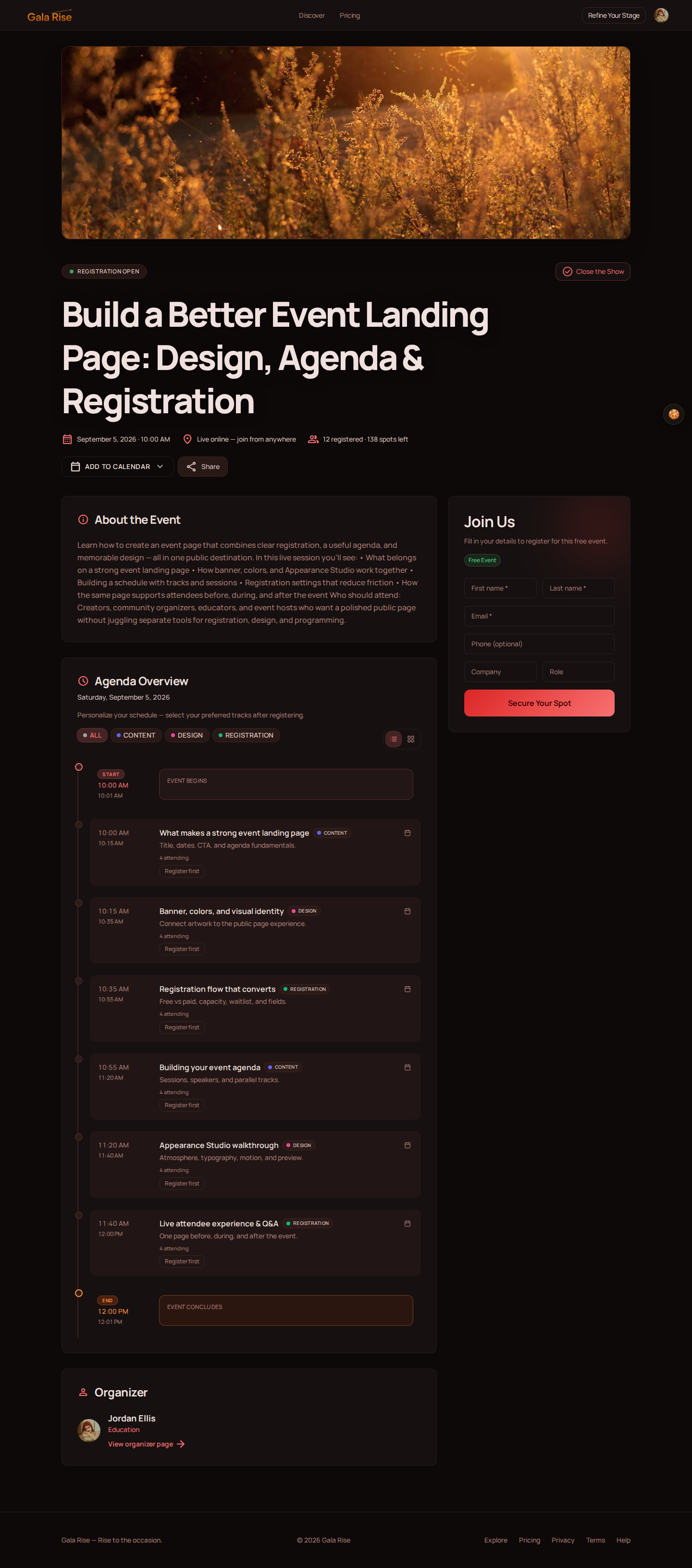
With Gala Rise, the public event page combines event information with the registration experience, allowing visitors to learn about the event and secure their spot from the same page.
5. A Useful Event Agenda
If your event contains multiple sessions, workshops, or speakers, show them. An agenda reduces uncertainty and gives visitors another reason to register.
6. Visual Identity
Your page should feel connected to the event. A cybersecurity conference, wellness workshop, design meetup, and exclusive executive session probably should not all look exactly the same.
This is where event page design becomes part of the attendee experience rather than decoration.
How to Create an Event Page with Gala Rise
Gala Rise is designed around a straightforward event creation flow. From the dashboard, start with Set the Stage to create a new event.
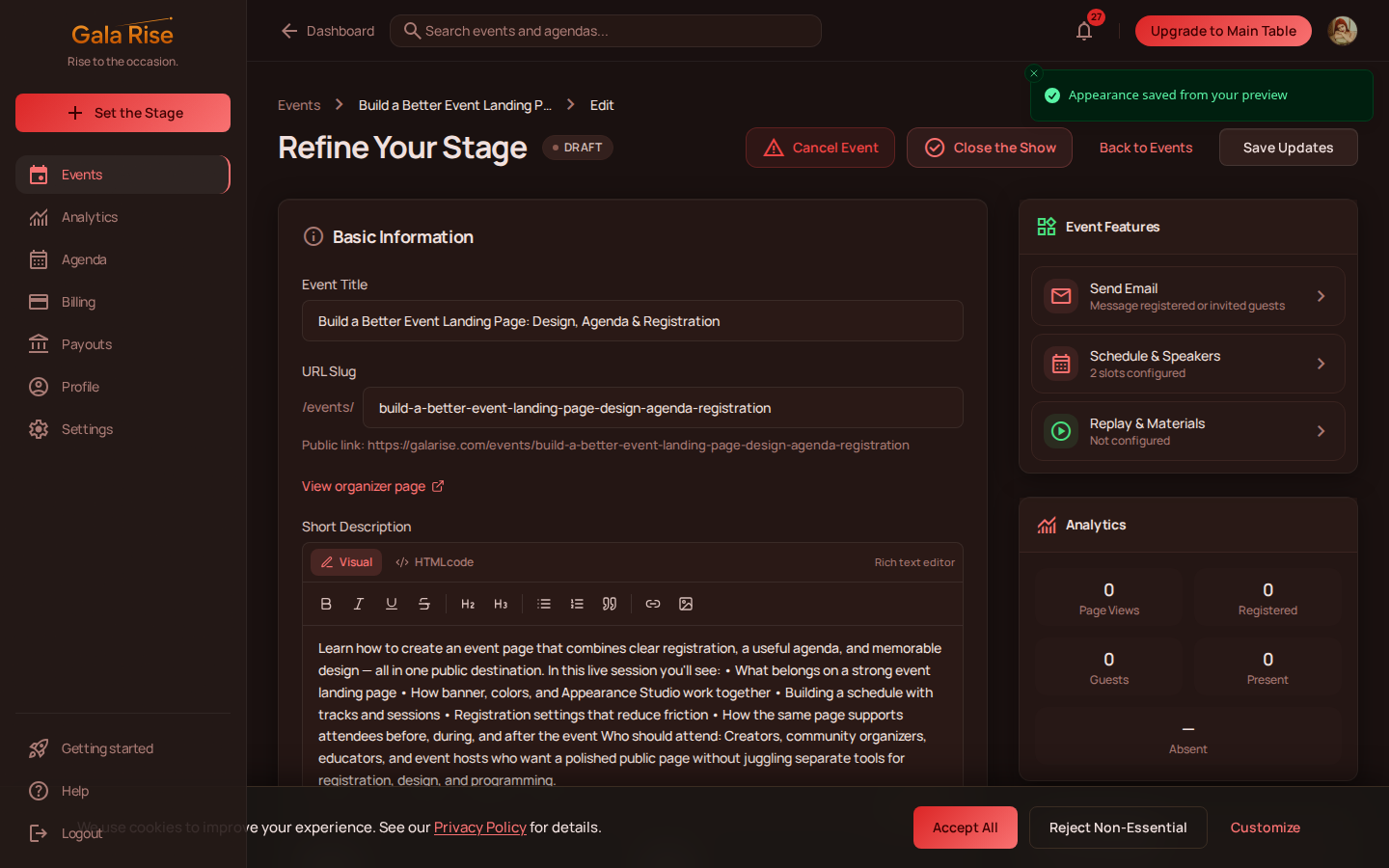
Step 1: Add the Event Basics
Start with:
- Event title
- Description
- Start and end dates
- Timezone
- Category
These details form the foundation of your public event page.
Step 2: Upload a Banner
Your banner gives visitors an immediate visual reference for the event. In Gala Rise, it can also influence the visual experience of the page because the Appearance Studio can derive colors from your banner.
This makes it easier to create an event page where the background, interface, and event artwork feel connected.
Step 3: Choose Your Visibility
Decide whether your event should be public or private. Public events can be discovered more broadly, while private events can be shared directly with the people you want to invite.
Step 4: Configure Registration
Choose how people will register for your event. Depending on your setup, you can configure:
- Free or paid registration
- Maximum attendance
- Invitation capacity
- Registration fields
If capacity is reached, the public experience can transition to a waitlist instead of simply rejecting new visitors.
Step 5: Customize Your Event Page Design
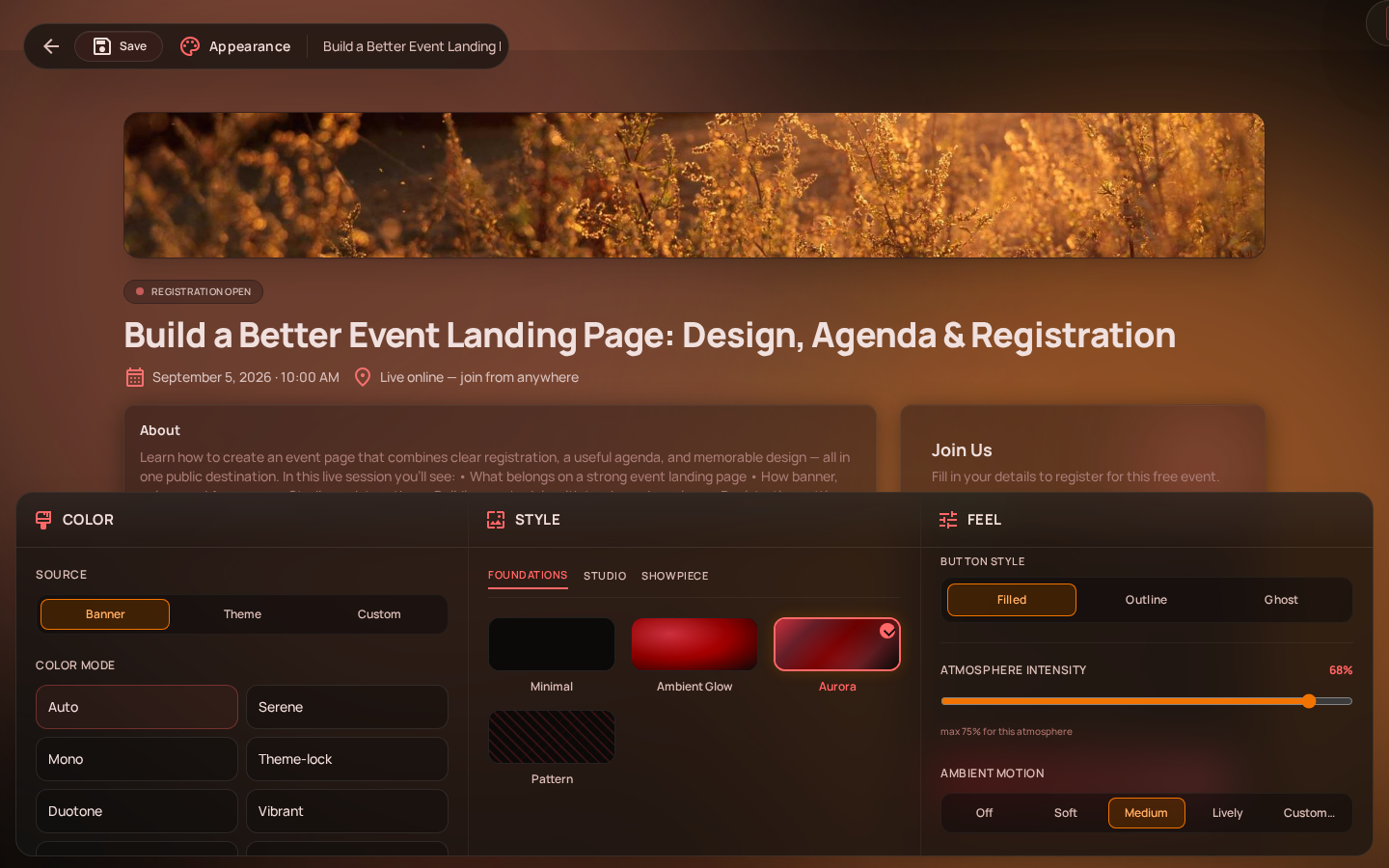
Open the Appearance Studio to move beyond a generic event template and customize how the public page feels to visitors.
Step 6: Connect Your Live Event
If the event is online, configure how registered attendees will join. Gala Rise supports its GoBrunch integration as well as external meeting platforms and manual event links.
The public event landing page can remain the attendee-facing destination instead of exposing the underlying meeting URL directly.
Step 7: Create the Event
Once the required information is ready, use Raise the Curtain. Your event receives its own public URL, which you can share with your audience.
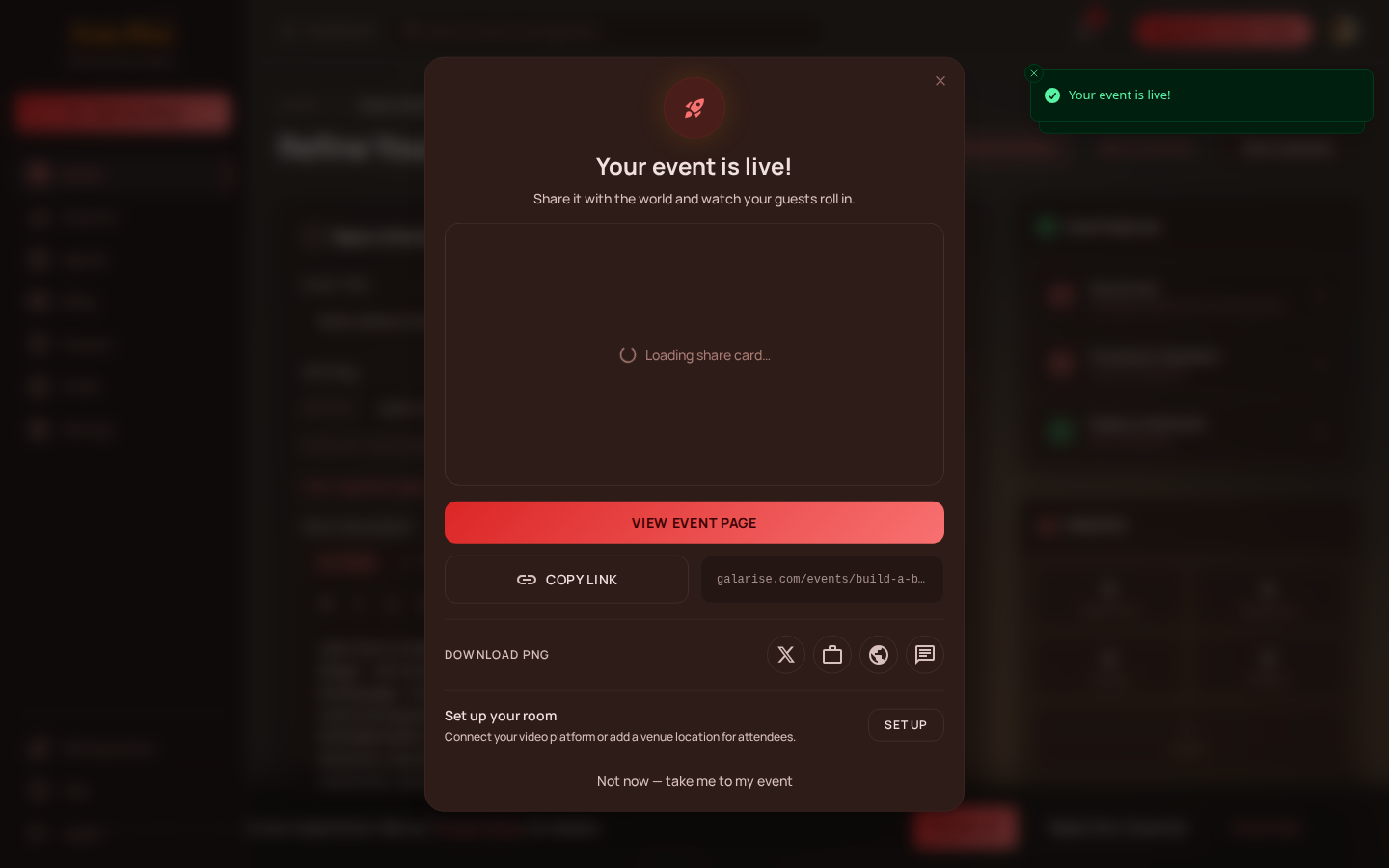
From there, you can continue managing areas such as the schedule, speakers, participants, emails, payments, and analytics.
Event Page Design: Make the Page Feel Like the Event
Good event page design is not just about choosing a background color. The visual experience should support the type of event you are organizing.
A business summit may need something clean and restrained. A creative event can use more movement and visual energy. A wellness event might benefit from softer colors and typography.
Gala Rise’s Appearance Studio is built around this idea. Instead of editing the internal dashboard theme, the Appearance Studio controls what visitors see on the public event page.
Choose an Atmosphere
Start by selecting a visual atmosphere for the background. Depending on the available options for your plan, styles range from more minimal foundations to animated and more expressive visual experiences.
The important part is not using animation for the sake of animation. The background should complement the content without making titles, forms, or calls to action harder to read.
Build the Color Palette
The Appearance Studio can derive or define colors using:
- Your event banner
- A visual theme
- A custom color when supported
This is useful when you already have event artwork or brand assets and want the event landing page to feel like part of the same campaign.
Choose the Right Typography and Components
Typography changes how an event feels before the visitor reads a single paragraph. Appearance Studio controls include areas such as:
- Font style
- Border radius
- Button style
- Theme
These settings affect elements across the public page, including headings, cards, fields, and registration buttons.
Control Motion
Motion can add depth to an event page, but it should remain intentional. Gala Rise allows organizers to control elements such as ambient motion, intensity, and how compatible backgrounds respond while visitors scroll.
Preview Before Publishing
The Appearance Studio provides a live preview while you edit. You can switch between desktop and mobile views and compare your current draft with the previously saved appearance.
That means your event page design does not have to be a guessing game. You can experiment before committing to a final visual direction.
Event Agenda Builder: How to Build a Clear Event Agenda
A beautiful page will not solve a confusing event schedule. If your event includes multiple sessions, the agenda should make it easy for attendees to understand what happens and when.
This is where an event agenda builder becomes important.
In Gala Rise, there are two different concepts worth understanding: the schedule inside an individual event and an Agenda that groups multiple events.
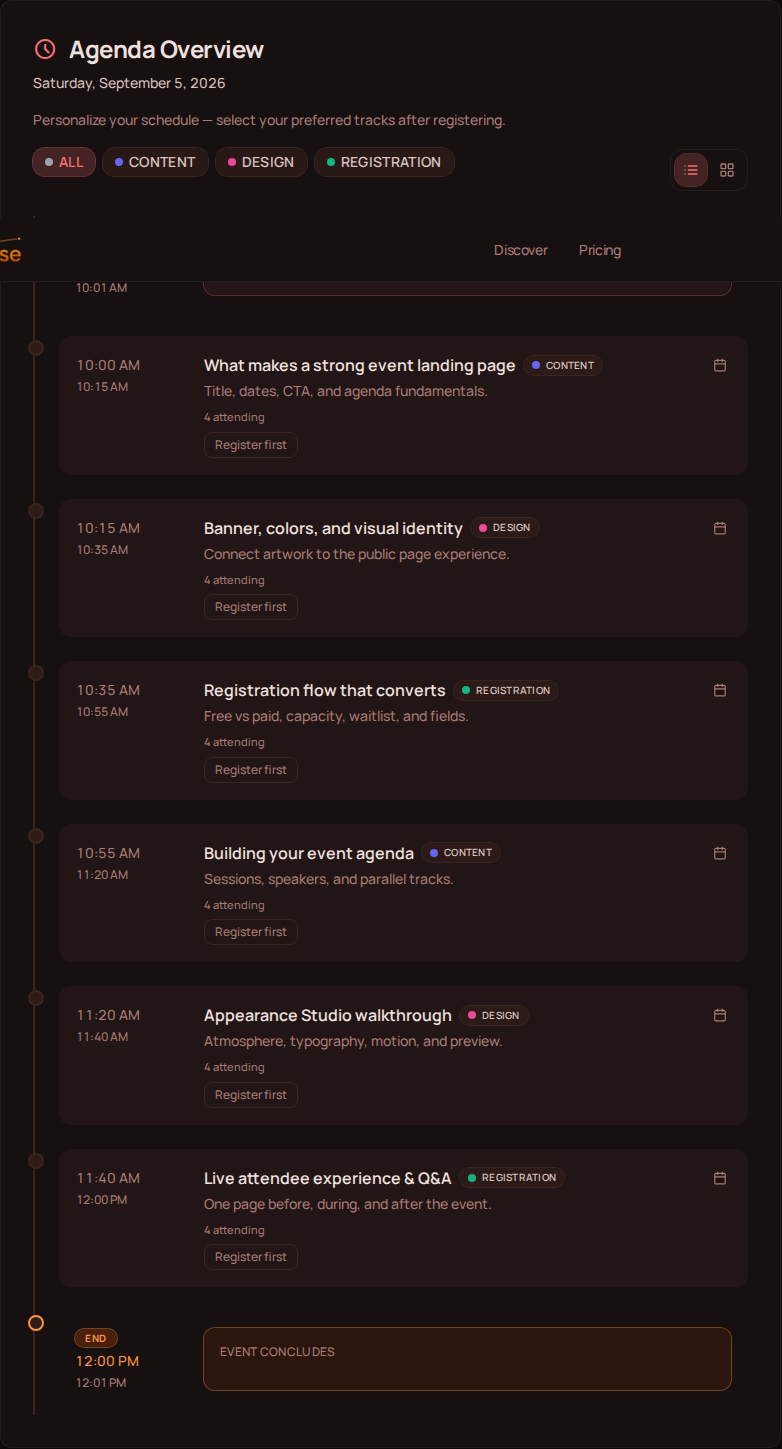
Build a Schedule Inside Your Event
Every event can contain a timeline of sessions. A session can include information such as:
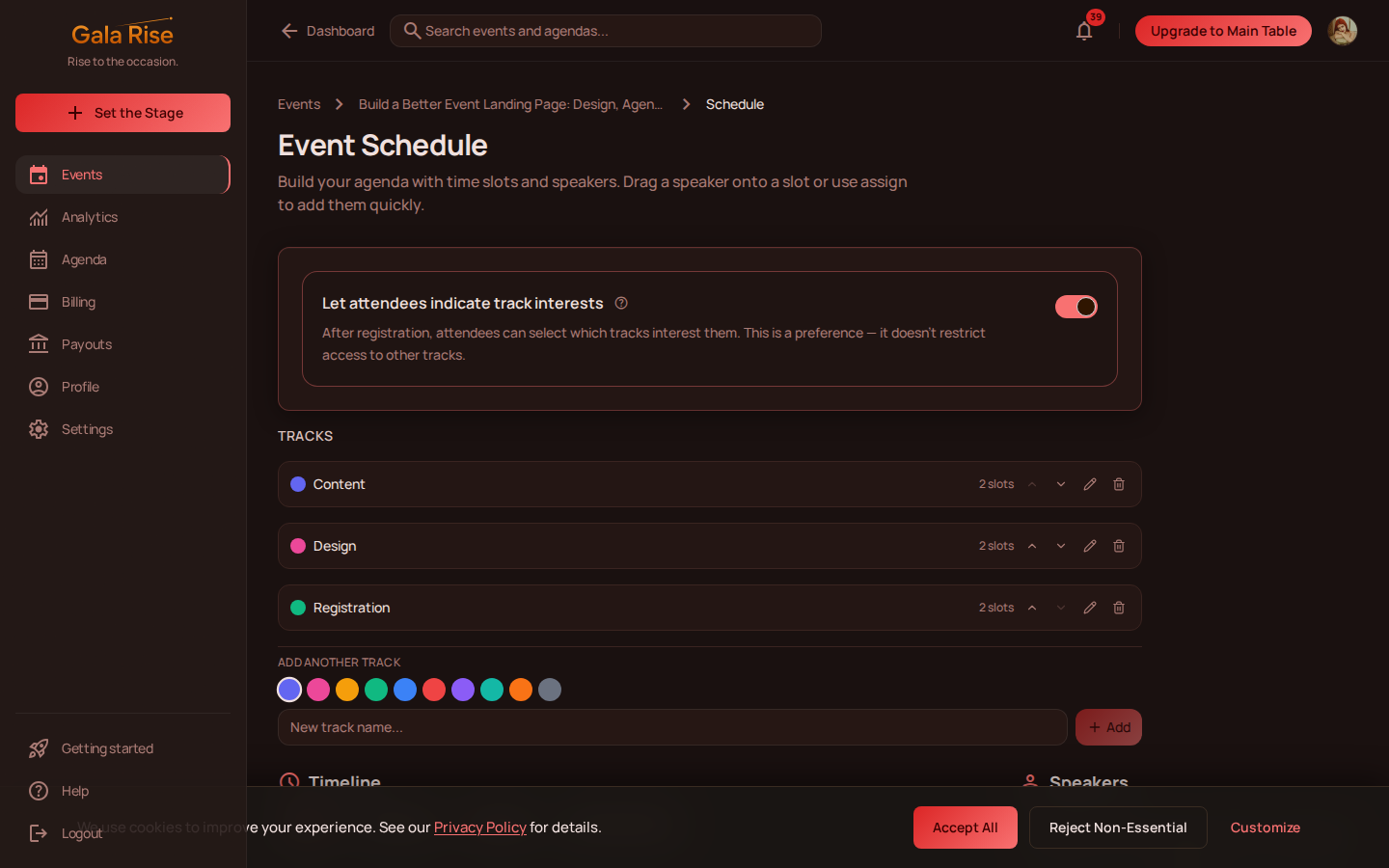
- Session title
- Description
- Start time
- End time
- Speakers
- Meeting information when relevant
This works well for:
- Webinars with multiple segments
- Online workshops
- Conferences
- Training sessions
- Multi-speaker events
Instead of placing the entire schedule inside the event description, visitors can see a structured timeline.
Use Tracks for Parallel Content
Some events run multiple sessions at the same time. For example, a conference might have:
- Strategy Track
- Engineering Track
- Marketing Track
On eligible plans, Gala Rise supports tracks that allow sessions to be organized into parallel programs. Registered attendees can also interact with individual sessions in supported configurations.
So when choosing an event agenda builder, think beyond simply listing times. A useful agenda should help people understand the structure of the event.
Use Gala Rise Agendas for Multiple Events
Sometimes one event page is not enough. You may be organizing:
- A month-long webinar series
- A community event calendar
- A virtual summit
- A festival
- A recurring workshop program
- A collection of events from multiple organizers
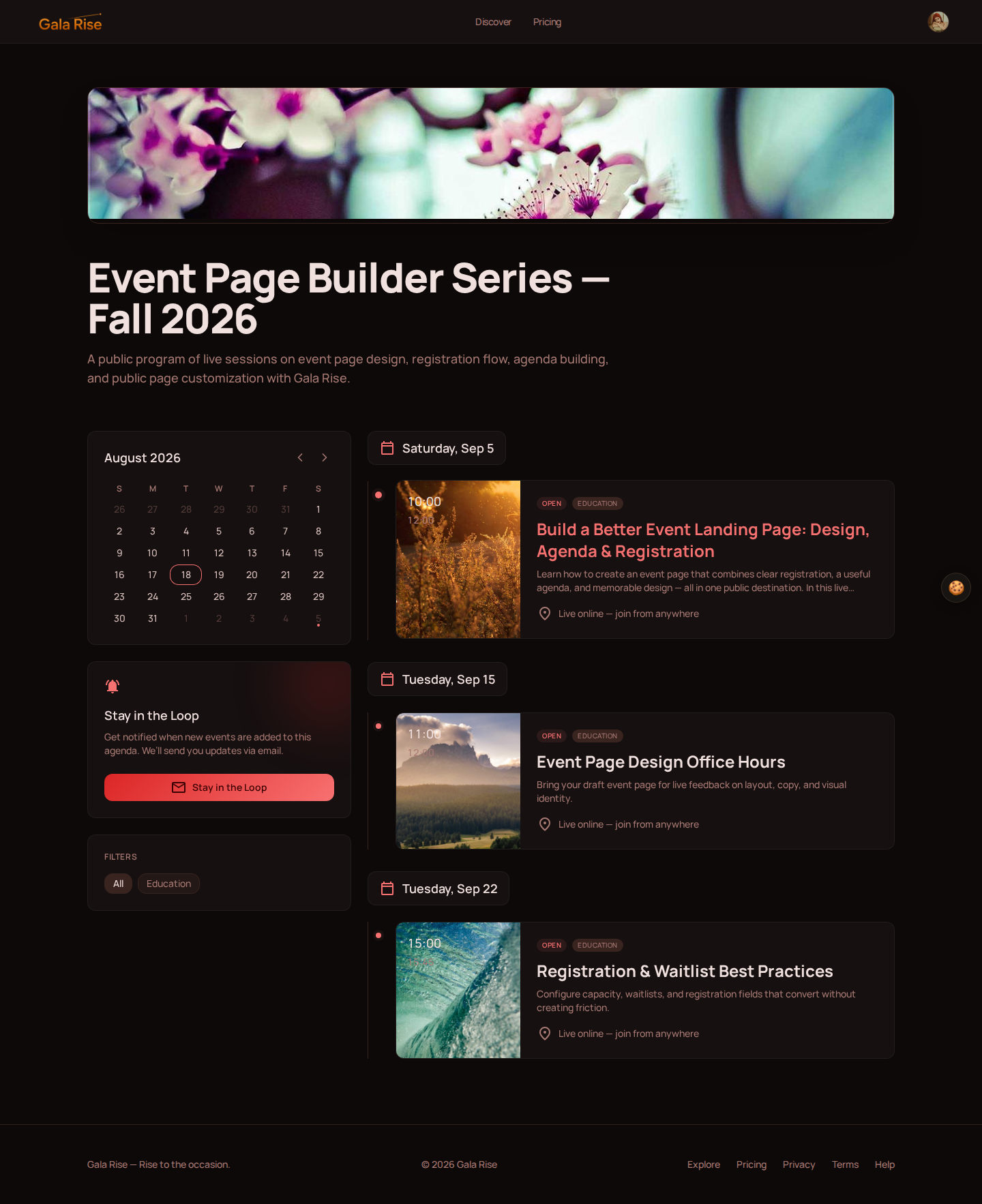
In this case, Gala Rise Agendas are designed to group multiple individual events together on supported plans.
An Agenda has its own public page and can contain multiple events arranged into a unified program. Visitors can browse events through a calendar and timeline while individual registrations still happen on each event’s own page.
Event schedule: sessions inside one event.
Gala Rise Agenda: multiple events grouped into one public program.
An event can also appear in more than one Agenda, giving organizers flexibility when curating different collections.
Why Event Agenda Design Matters
Visitors often scan an event agenda before reading the full event description. They want to know whether the schedule contains something valuable to them.
A good agenda should therefore be:
- Scannable: visitors should quickly identify session names, times, and speakers.
- Structured: use tracks or logical groupings when the program becomes large.
- Relevant: avoid adding filler sessions just to make an event look bigger.
- Easy to navigate: multi-day programs should remain understandable without becoming a wall of text.
Your event agenda should reduce cognitive load, not add to it.
Event Page Design Tips That Can Improve Registration
You do not need dozens of design elements to create an effective event landing page. A few decisions usually matter more.
Keep Your Main Message Above the Fold
A visitor should quickly see:
- What the event is
- When it happens
- Why it matters
- How to register
Match the Page to the Event
Use visual choices that support the event’s personality. A formal event may need restrained typography and motion. A creative event can afford to feel more expressive.
Make the Registration Action Obvious
Your CTA should not compete with ten other actions. When someone decides they want to attend, the next step should be immediately clear.
Design for Mobile Visitors
Many people may first open your event link from an email, messaging app, or social network on their phone. Always verify that the page still communicates the most important information at a smaller size.
The Gala Rise Appearance Studio lets you switch between desktop and mobile previews while editing.
Use Motion Carefully
Animated backgrounds can make a page memorable, but too much movement can make reading uncomfortable. Treat motion as atmosphere rather than the main attraction.
Keep the Agenda Readable
Do not sacrifice clarity for visual creativity. Your agenda is functional content. Times, sessions, and speakers need to remain easy to understand.
One Event Page Before, During, and After the Event
A useful event page does not have to stop being useful once registration closes. The attendee’s needs simply change.
Before the Event
- Discover the event
- Understand the topic
- Review the agenda
- Register
During the Event
For configured online events, registered attendees can use the page to access the live experience when the event is live. This keeps the event page relevant instead of forcing attendees to search through old emails for a meeting link.
After the Event
For events with post-event content enabled, registered attendees can return to access replay content and materials.
That means the same URL can support a much longer attendee journey.
Create an Event Page That Does More Than Collect Registrations
A good event page should answer questions before visitors have to ask them. It should explain the event, communicate its value, show the agenda, create a clear path to registration, and visually match the experience you are promising.
With Gala Rise, those pieces can live together. You can create an event page, customize its appearance, build a session schedule, manage registrations, connect the live experience, and organize multiple events through Agendas.
Instead of treating the event landing page as a disposable registration form, you can make it the central destination for your event.
Ready to Create Your Event Page?
Build your next event page, agenda, registration flow, and public experience with Gala Rise.
Create an event with Gala RiseFrequently Asked Questions About Event Pages and Event Agendas
How do I create an event page?
Start by defining your event title, description, dates, timezone, registration settings, and visual identity. With Gala Rise, you can configure these details from the event creation flow, customize the public page through the Appearance Studio, connect your live event if needed, and then create your public event page.
What should an event landing page include?
A good event landing page should include the event title, description, dates and times, a clear registration CTA, visual identity, an agenda or schedule when relevant, and organizer information.
What makes a good event page design?
Good event page design prioritizes clarity while matching the personality of the event. Use a consistent color palette, readable typography, clear buttons, a strong banner, and intentional motion. Always check the page on both desktop and mobile.
What is an event agenda builder?
An event agenda builder is a tool used to organize sessions, speakers, times, and sometimes parallel tracks into a structured event schedule. Gala Rise supports schedules inside individual events and Agendas for grouping multiple events into a larger program.
What is the difference between an event agenda and an event schedule?
In Gala Rise, an event schedule represents the sessions inside a single event. An Agenda is a separate collection that can group multiple events into one public program.
Can I customize my event landing page?
Yes. Gala Rise’s Appearance Studio lets you customize the public appearance of your event using visual atmospheres, colors, themes, typography, component styles, and motion options, with a live preview before saving changes.
Can I create a multi-day event agenda?
Yes. Depending on how your program is structured, you can create sessions within an event or use a Gala Rise Agenda to group multiple events across different days into a unified public program.
Can visitors access the event from the same page they used to register?
For configured online events, the event page can continue to serve registered attendees when the event becomes live. Gala Rise can provide the appropriate live access experience to registered participants without publicly exposing the underlying meeting URL.